To check the IMEI (International Mobile Equipment Identity) Type:
*#06#
Information you get from the IMEI-
XXXXXX XX XXXXXX X
TAC FAC SNR SP
TAC = Type approval code
FAC = Final assembly code
SNR = Serial number
SP = Spare
To check the phones Software revision type-
*#0000#
Information you get from the Software revision-
V 05.31
18-02-99
NSE-3
1ST Line = Software revision
2ND Line = The date of the software release
3RD Line = Phone type
To enter the service menu type-
*#92702689# (*#WAR0ANTY#)
Serial number (IMEI)
Production date (MM/YY)
Purchase date (MM/YY) You can only enter the date once.
Date of last repair (0000=No repair)
Transfer user data to another Nokia phone via Infra-Red
Clock Stopping
To check weather your SIM Card supports clock stopping type-
*#746025625# (*#SIM0CLOCK#)
Revealing the Headphone and Car-Kit menus
Please note that if you do these next tricks, the new menus can't be erased without retoring the factory default settings. To do these tricks you need to short-circuit the pins on the bottom of the phone next to where you plug in you charger.
1. To activate the "Headset" menu, you need to short-circuit pins "3" and "4". After a short time the word "Headset" will be shown in the display. Menu 3-6 is now enabled.
2. To activate the "Car" menu, you need to short-circuit pins "4" and "5". After a short time the word "Car" will be shown in the display. Menu 3-7 is now enabled.
THE REBOOT TRICK
This should work on all software versions of the 6110.
1. Go to the Calendar (Menu-8)
2. Make a note or reminder.
3. Enter some text into the edit box.
4. Hold "Clear" until the whole text is cleared, then press "Back".
5. Press "0". The main screen will now be showing but a space appears on the screen. (you can't see it)
6. Enter 4 digits (e.g. 1234).
7. Use the down arrow to move the cursor to the left side of the numbers and the space (Down arrow twice).
8. Now enter 6 digits and press the call button.
Wait for a few seconds, the screen should start to flash and reboots. It should alsowork on other menus like the "Profiles" menu.
EFR CALL QUALITY
To activate EFR (Enhanced Full Rate) Enter the code-
*3370#
This improves call quality but decreases batterylife by about 5%
To deactivate it, Enter the code-
#3370#
THE JAMES BOND TRICK
If you short-circuit theleft middle and right pins on the bottom of the phone with all connections touching each other, the Nokia software hangs! The profile "Headset" will be activated. Before you do this just activate the "Automatic Answer" in the headset profile and set the ringing volume to "Mute". Now you can use your phone for checking out what people are talking about in a room. Just place it under a table in a room and call it. The phone receives the call without ringing and you can listen to what people are saying.
NETWORK MONITOR
There is a hidden menu inside your Nokia phone. If you want to activate it, you'll have to re-program some chips inside of your phone.
Check your software version. You can only continue if you have v4.33, v4.73 or v5.24.
Take apart the phone.
De-solder the EEPROM (ATMEL AT 24C64).
Read out the data with an EEPROM programmer and save it to a file (Backup).
If you have v.33 or v4.73, change the address "03B8" from "00" to "FF".
If you have v5.24 then change the address "0378" from "00" to "FF".
Write the new data to the EEPROM and solder it back to the phone,
Power on your phone and you should have "Netmonitor" enabled.
The Network Monitor gives you the following information.
Carrier number
MS RX Level in DBM
Received signal quality
MS TX power level
C1 (Path loss criterion, used for cell selection and reselection). The range is -99 to 99.
RTL (Radio link timeout).
Timeslot
Indication of the transmitter status
Information on the Network parameters.
TMSI (Temporary Mobile Subscriber Identity).
Cell identification (Cell ID, Number of cells being used).
MCC (Mobile country code)
MCN (Mobile network code)
LAC (Location area code)
Ciphering (On/Off)
Hopping (On/Off)
DTX (On/Off)
Discard cell barred information
CHECK SIM-LOCK
Note - If you bought your Nokia on UK Vodafone or UK Cellnet you do not need to check this because they both transmit on GSM900, and they don't lock the phones. However if you bought your phone on UK Orange or UK One2one your phone may be blocked. The reason is that they both transmitt on GSM1800. To make a call on GSM1800 you need what is known as a "Dual band" phone. A dual band phone is able to transmit on both GSM900 and GSM1800, so they lock the phones so you can't use it with any other network simcard. If you find that your phone is locked you can try different software to unlock it. (we havn't found one that works yet), or you can ask your service provider who will gladly exchange the 10 digit code for about £35.
This is how to check the status of the 4 different locks. Aslo don't try entering the wrong number, because after 3 times it will block the phone for good.
There are 4 different locks on your Nokia phone.
COUNTRY-LOCK
NETWORK-LOCK
PROVIDER-LOCK
SIMCARD-LOCK
The code to read out the sim-lock status of your phone is
#PW+(MASTERCODE)+(Y)#
# = DOUBLE-CROSS
W = PRESS "*" THREE TIMES
P = PRESS "*" FOUR TIMES
+ = PRESS "*" TWO TIMES
MASTERCODE = 1234567890
Y = NUMBER 1 TO 4
The master code is a secret code. The code has 10 digits, To read out the sim-lock status you can enter every combination you want!
"Y" Shows the status of the network-lock. Here you can enter a number from "1" to "4". The "4" is for the sim-card lock.
SIM-LOCK CHECKS
#PW+1234567890+1# = GIVES PROVIDER-LOCK STATUS
#PW+1234567890+2# = GIVES NETWORK-LOCK STATUS
#PW+1234567890+3# = GIVES COUNTRY-LOCK STATUS
#PW+1234567890+4# = GIVES SIM-CARD-LOCK STATUS.
Wednesday, January 18, 2012

How to Find IMEI Number of Your Mobile Phone
IMEI number or International Mobile Equipment Identity number is a unique number associated with every GSM and UMTS mobile phone and can help you find your stolen cell phone easily. Save your IMEI number today.
Find IMEI number
 To find your mobile phone IMEI number, simply dial the sequence *#06# into the phone. The unique 15 digit IMEI code of your cell phone will be instantly displayed. Copy it and keep it in a safe place so that you can find it when you phone is misplaced or stolen. You can also find the IMEI number by checking the compliance plate under the battery.
Why is IMEI number useful?If your mobile phone gets misplaced, lost, or stolen – you can inform the the network provider who can then put the serial number (the IMEI number for the phone) on a shared database. This list stops this particular phone from registering on any network and will be useless for anyone even if the mobile phone’s SIM card is changed!
This IMEI number is also useful to unlock mobile phones and get them working once they are found. So find and write down your IMEI number right now, with growing incidence of stolen or lost mobile phones, you never know when it might be useful!
And to get all the information right – try the IMEI Number Analysis – If you know the IMEI code of a mobile phone, you can now check all known information regarding manufacturer, model type, date and country of approval. Amazing!
NOTE: This article is for information purposes only. Please do not post personal details about your lost phone and IMEI numbers in comments as they will be deleted. You need to contact your mobile service provider for more details.
Wednesday, December 28, 2011
Easy android taxi application
If you plan to visit Belarus, Czech Republic, Estonia, Georgia, Kazakhstan, Latvia, Lithuania, Moldavia, Poland, Romania, Russia, Slovakia or Ukraine, then this is really nice program to have in your android phone it has most Estonian taxis including prices and numbers to call

TaxidoIntexsoft |
 | (257) |
Description
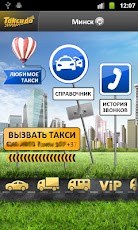
Taxido app - call the taxi in one tap
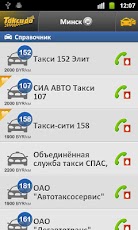
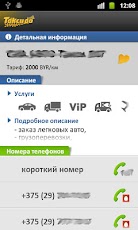
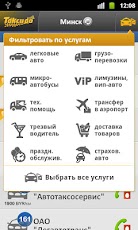
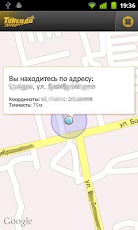
Taxido is a quick way to call a taxi from your mobile phone. Taxido automatically defines actual numbers of taxi companies on a base of your location so you can call taxi in one tap whenever you need it.
Countries: Belarus, Czech Republic, Estonia, Georgia, Kazakhstan, Latvia, Lithuania, Moldavia, Poland, Romania, Russia, Slovakia, Ukraine
Features:
* Regular updates of the database twice a day. You always have actual phone numbers, prices and list of cities and taxi companies.
* Ratings for taxi companies
* Actual data for 200 cities, more than 3000 taxi companies! The extensive database of the application is constantly updating.
* Automatic definition of geolocation
* Pay less for a taxi call! Taxido defines your mobile operator and substitutes automatically actual call numbers.
* Displays your address and geographical coordinates on map (You can provide taxi companies with this data)
* Widgets for your desktop
* Supports App2SD
* Works in roaming (just one connection to the Internet - and the database is at your disposal in any country)
* Saves your settings between device resets and application reinstalls
* Check an app and add you city on http://taxido.intexsoft.by
* Regular updates of the database twice a day. You always have actual phone numbers, prices and list of cities and taxi companies.
* Ratings for taxi companies
* Actual data for 200 cities, more than 3000 taxi companies! The extensive database of the application is constantly updating.
* Automatic definition of geolocation
* Pay less for a taxi call! Taxido defines your mobile operator and substitutes automatically actual call numbers.
* Displays your address and geographical coordinates on map (You can provide taxi companies with this data)
* Widgets for your desktop
* Supports App2SD
* Works in roaming (just one connection to the Internet - and the database is at your disposal in any country)
* Saves your settings between device resets and application reinstalls
* Check an app and add you city on http://taxido.intexsoft.by
Reminder:
In order to use widgets you have to install an app into phone's memory (not external storage)
In order to use widgets you have to install an app into phone's memory (not external storage)
Visit Developer's Website›Email Developer›
App Screenshots


Videos
User Reviews
| 5 star | 200 |
| 4 star | 29 |
| 3 star | 11 |
| 2 star | 5 |
| 1 star | 12 |
Transport in Tallinn for android
Transport in TallinnAndris Sprūds |
 | (24) |
Description
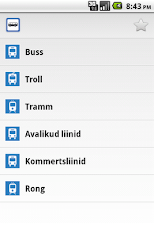
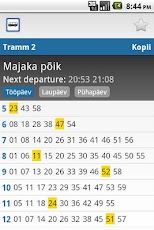
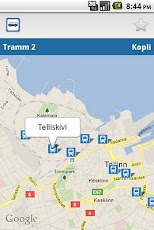
Public Transit Schedules in Tallinn, Estonia
This application provides information on public transit schedules in Tallinn, Estonia. Transport routes can be viewed on the map, the application can display your location using GPS support. The user interface is available in Lithuanian, Latvian and English languages.
Please note that I can not respond to your comments in Android Market. You are welcome to contact me directly at android at spruds dot com in case you want to provide any feedback about the application.
App Screenshots
User Reviews
| 5 star | 24 |
| 4 star | 0 |
| 3 star | 0 |
| 2 star | 0 |
| 1 star | 0 |
SPB TV
SPB TVMobiWorld Media |
 | (15,478) |
Description
SPB TV - Stay Tuned On the Go!
Use SPB TV to watch live and video-on-demand TV channels on your device. You can use a 3G or Wi-Fi connection. More than 120+ channels. No subscription fee!
Android Developer Challenge winner in Media category. More than 10 million users worldwide.
SPB TV Features:
A wide selection of public TV channels
Quick channel preview
Integrated TV guide
Fast channels launch and switching
Picture-in-picture mode
Video-on-demand
Onscreen controls
Quick channel preview
Integrated TV guide
Fast channels launch and switching
Picture-in-picture mode
Video-on-demand
Onscreen controls
Please rate the app if you like it. If you have any questions or comments, please email us atsupport@spbtv.com.
Tags: Live TV, World channels, TV viewer, Mobile TV, Streaming, Online TV
Visit Developer's Website›Email Developer›
App Screenshots


Videos
User Reviews
| 5 star | 7,358 |
| 4 star | 3,206 |
| 3 star | 1,894 |
| 2 star | 840 |
| 1 star | 2,180 |
Subscribe to:
Posts (Atom)